How-to guide
Capture claims from a transcript
Import a timestamped transcript, review candidate claims, and decide which candidates become facts in the vault.
Use transcript workflows when a meeting, interview, or recording contains several statements worth reviewing individually. Claimframe keeps the imported words, speaker, and timestamp as evidence; extraction proposes structured claims from that evidence. Nothing becomes a stored assertion until you accept its candidate.
This page describes the transcript-driven workflow. If you need to extract claims from unstructured documents, choose Document Intake in the activity bar.
Transcript import
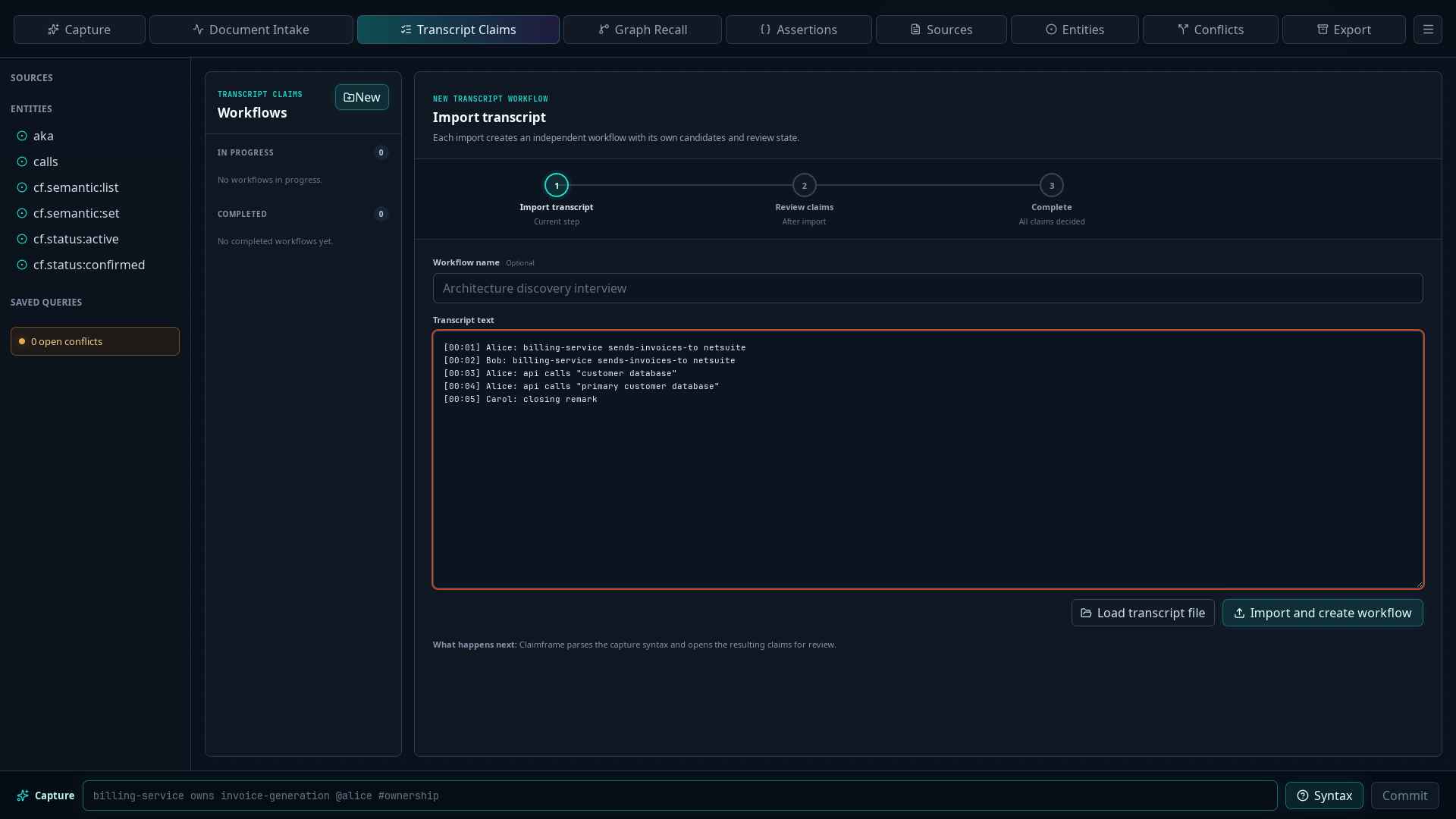
- Choose Transcript Intake in the activity bar, then choose New at the top of the Workflows sidebar.
- Give the workflow a recognizable name. The name is optional but useful when several interviews are in progress.
- Paste the transcript, or choose Load transcript file to read a local text file.
- Choose Import and create workflow.
- Confirm the workflow appears under In progress and that the workflow timeline advances beyond Import transcript.
Transcript file format
Use UTF-8 plain text with one speaker segment per nonblank line:
[timestamp] Speaker: segment text
- Text inside leading square brackets becomes the segment’s evidence timestamp. Claimframe accepts labels such as
[00:01],[00:32:18], or another source-specific position. - Text before the first colon becomes the speaker.
- Everything after the first colon becomes the segment text.
- A line without a timestamp is still imported and receives its sequence number as its position.
- A line without a colon is imported with an unknown speaker.
- Put multi-word capture values in double quotes when using structured capture syntax.
For example:
[00:01] Alice: billing-service sends-invoices-to netsuite
[00:02] Bob: billing-service sends-invoices-to netsuite
[00:03] Alice: api calls "customer database"
Import stores the source and its segments. It does not by itself create facts in the assertion ledger.
Candidate review
After import, Claimframe prepares candidate claims from the structured transcript lines and advances the workflow to Review claims. Review each candidate against the transcript before deciding whether it should become a fact in the vault.
- Select the workflow under In progress in the Workflows sidebar and inspect the proposed candidates and extraction issues.
- Compare each candidate’s subject, predicate, and object with the displayed source words and supporting excerpts.
- Correct the structured fields when the proposal does not faithfully represent the source, then save the edits.
- Choose Accept to create an assertion, Defer to leave the candidate unfinished, or Reject to make a final decision without creating an assertion.
- Use the status tabs to revisit accepted, deferred, or rejected candidates. Undo last defer/reject reverses the most recent reversible decision.
- Open Query and confirm accepted candidates retain the transcript source and exact segment evidence.
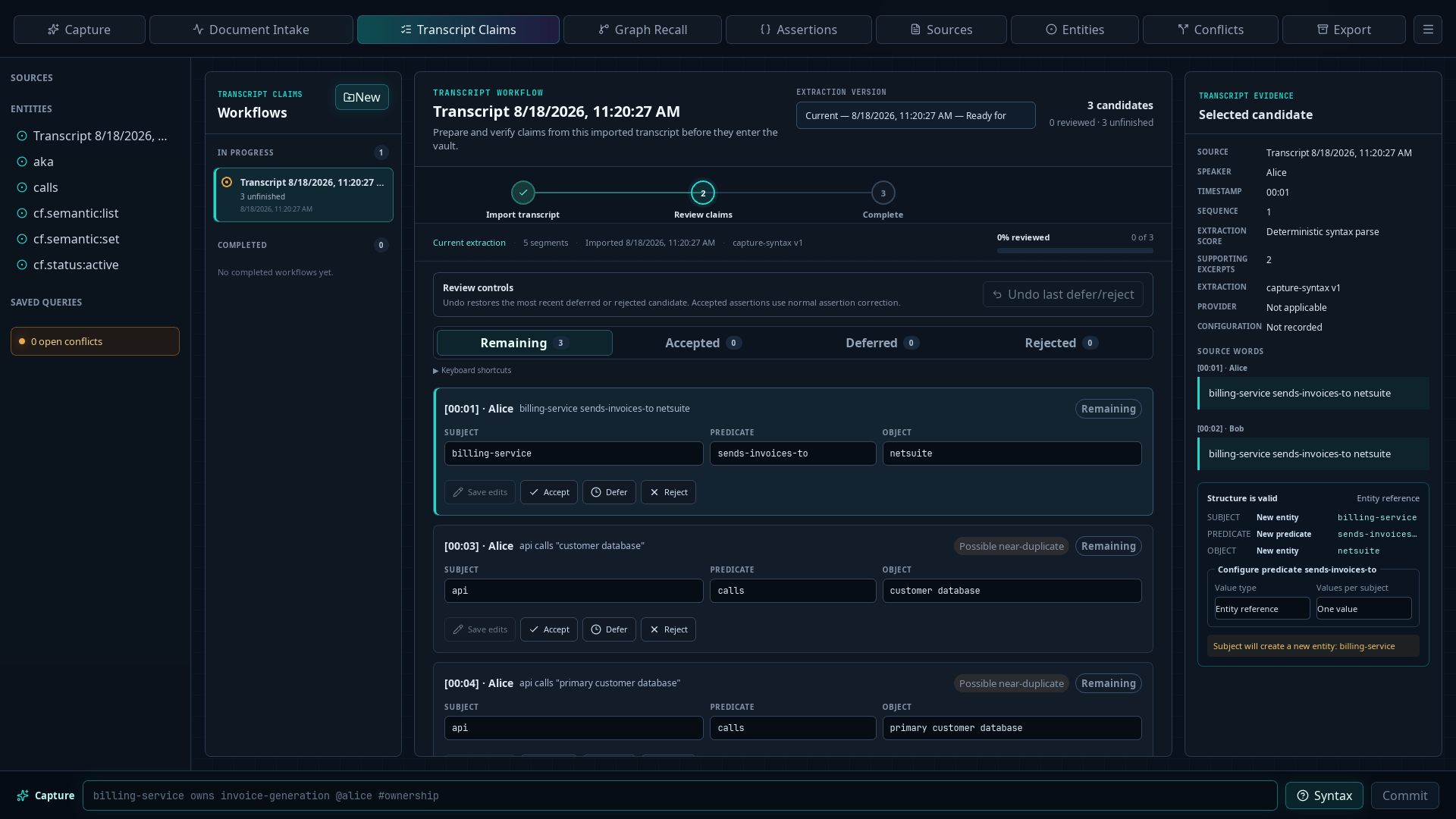
When a candidate uses a predicate that is not yet in the vault, its evidence and validation panel marks it as New predicate. Under Values per subject, choose One value when each subject should have at most one current value for the predicate, or Multiple values when several values may be current at once. See Predicate settings for the consequences of this choice and the other available predicate settings.
The same normalized claim may appear in more than one transcript segment. Claimframe can present it as one candidate with multiple supporting excerpts. Similar but non-identical claims remain separate for review, and a line that cannot be parsed appears as an extraction issue rather than becoming a fact silently.
Rejecting an extraction candidate is not the same as marking an existing assertion rejected: an unaccepted candidate has never entered the assertion ledger. If speaker detection, segmentation, or extraction is ambiguous, correct the source or candidate before accepting it.
Complete the workflow
There is no separate completion button. Claimframe completes the workflow automatically when every candidate has a final decision.
- Open Remaining and decide each unfinished candidate.
- Accept candidates that should become facts in the vault, or Reject candidates that should not. A deferred candidate remains unfinished, so return to Deferred and give it a final decision when you are ready.
- Confirm the timeline reaches Complete and the message Transcript claim review complete appears.
- Confirm the workflow moves from In progress to Completed in the workflow list.
Accepted candidates are available under Query. Rejected candidates remain part of the transcript workflow’s review history but do not become assertions.