How-to guide
Manage a vocabulary
Preview, adopt, verify, and—while still unused—remove a vocabulary release from the current vault.
Use a vocabulary when you want the current vault to share established names, predicate shapes, or general domain knowledge. Adoption imports an immutable release into one vault; it does not change any other vault.
Bundled vocabularies
Claimframe includes four releases. Review the vocabulary guide before adopting one so its formal meaning and intended use fit the vault:
- RDF/RDFS 1.1 provides foundational terms for types, classes, properties, labels, domains, ranges, and schema hierarchies.
- OWL 2 Core provides formal ontology terms for equivalence, disjointness, restrictions, keys, and property behavior.
- Dublin Core Metadata Terms describes documents, datasets, software, standards, services, and other resources.
- FOAF 0.99 describes people, organizations, groups, projects, documents, accounts, and their relationships.
You can use a vault without adopting any vocabulary. Adopt one when stable identifiers, interoperability, or a shared domain language justify the added schema.
Preview a release
- Choose Settings at the foot of the activity bar, then expand Vocabularies in its sidebar. You can also choose Tools → Manage Vocabularies.
- Select a supplied release in the Vocabularies sidebar, or choose Import vocabulary file in its section header to preview a local
.cfvocabpackage. - Review the publisher, namespace, license, release number, attribution, and content counts.
- Scan Contents for the terms and predicates you expect. If the preview reports local name collisions, review the replacement tokens before continuing.
Claimframe does not overwrite a colliding local name. It preserves the vocabulary’s stable identifier and shows the vault token it will use instead.
Choose what to adopt
Under Import content, choose the kinds of content the vault needs:
- Terms imports classes, datatypes, schemes, and named concepts.
- Predicates imports properties and their value shapes.
- General knowledge imports the package’s assertions connecting those terms. It is available only when both terms and predicates are selected.
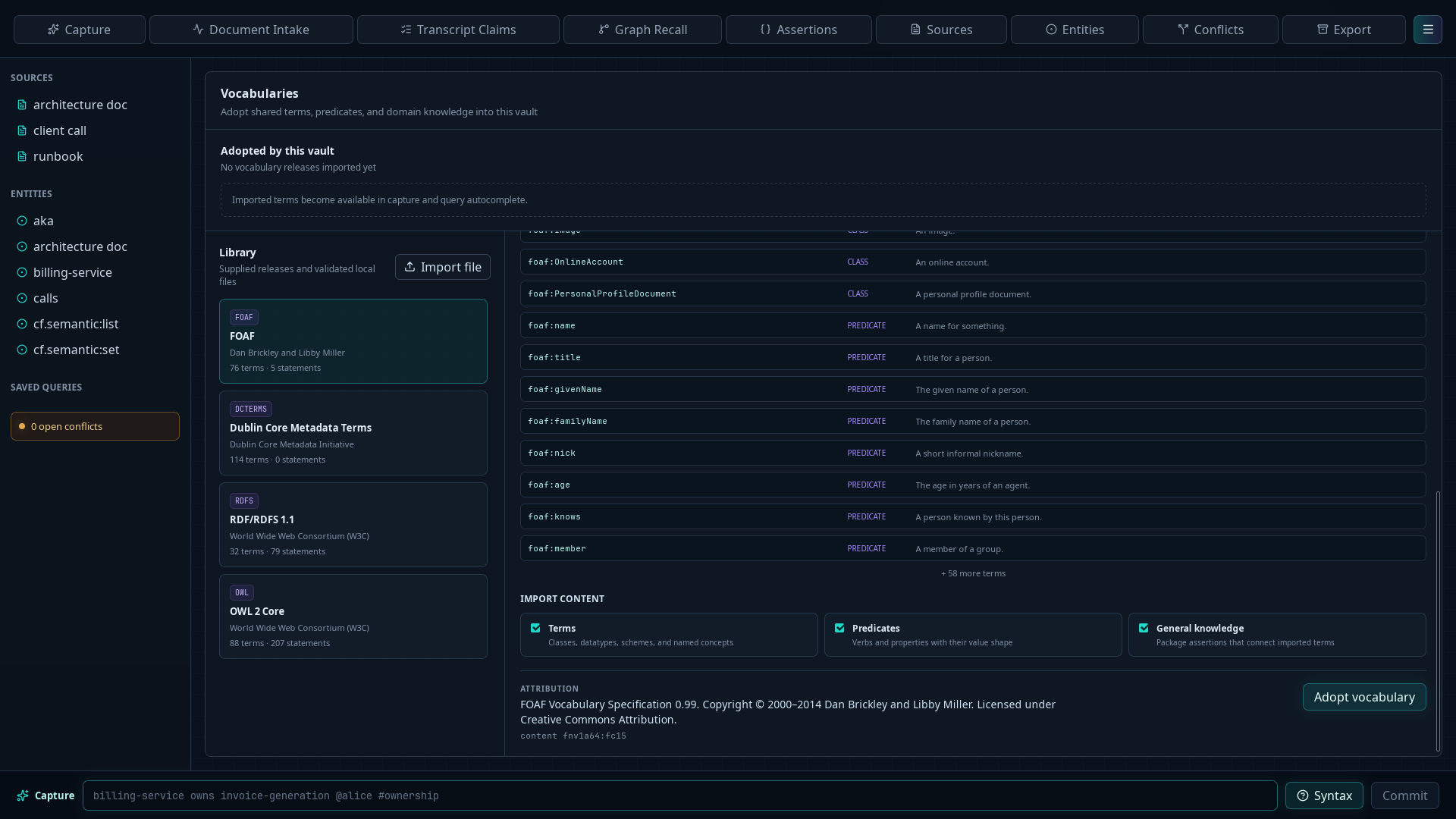
- Confirm the attribution displayed below the import choices.
- Choose Adopt vocabulary.
- Confirm that the release appears under Adopted by this vault.
- Verify that imported terms and predicates appear in capture and query autocomplete.
Claimframe blocks another release with the same vocabulary ID rather than treating it as an upgrade. Review and manage each adopted release as an immutable package.
Undo an adoption
- Return to Settings → Vocabularies.
- Select the adopted release in the sidebar.
- Choose Undo unused import, then confirm with Remove.
Undo succeeds only while no assertion, saved query, or other adopted vocabulary depends on the imported content. When the button is disabled, its explanation identifies why the release cannot be removed.
If Claimframe reports dependencies, leave the release installed. Removing or rewriting dependent domain data solely to force an undo can damage the vault’s historical model.