How-to guide
Find facts and save a query
Find the facts you need, narrow the results, and save the query pattern so you can run it again.
- Choose Query or Graph in the activity bar.
- Enter the smallest subject–predicate–object pattern that describes the needed result, then run it.
- Narrow the results with source, predicate, object, status, or conflicts-only filters where available. You can also select a value in an assertion row to pivot to a related result.
- Beside the query field, choose Save current query.
- In the Query name field, enter a recognizable name such as
Invoice ownership. - Choose Save. A success message confirms that the query pattern—not the matching facts—was saved in the current vault.
- Run the saved query from Saved Queries in the Query sidebar. Choose Tools → Manage Queries to rename or delete it.
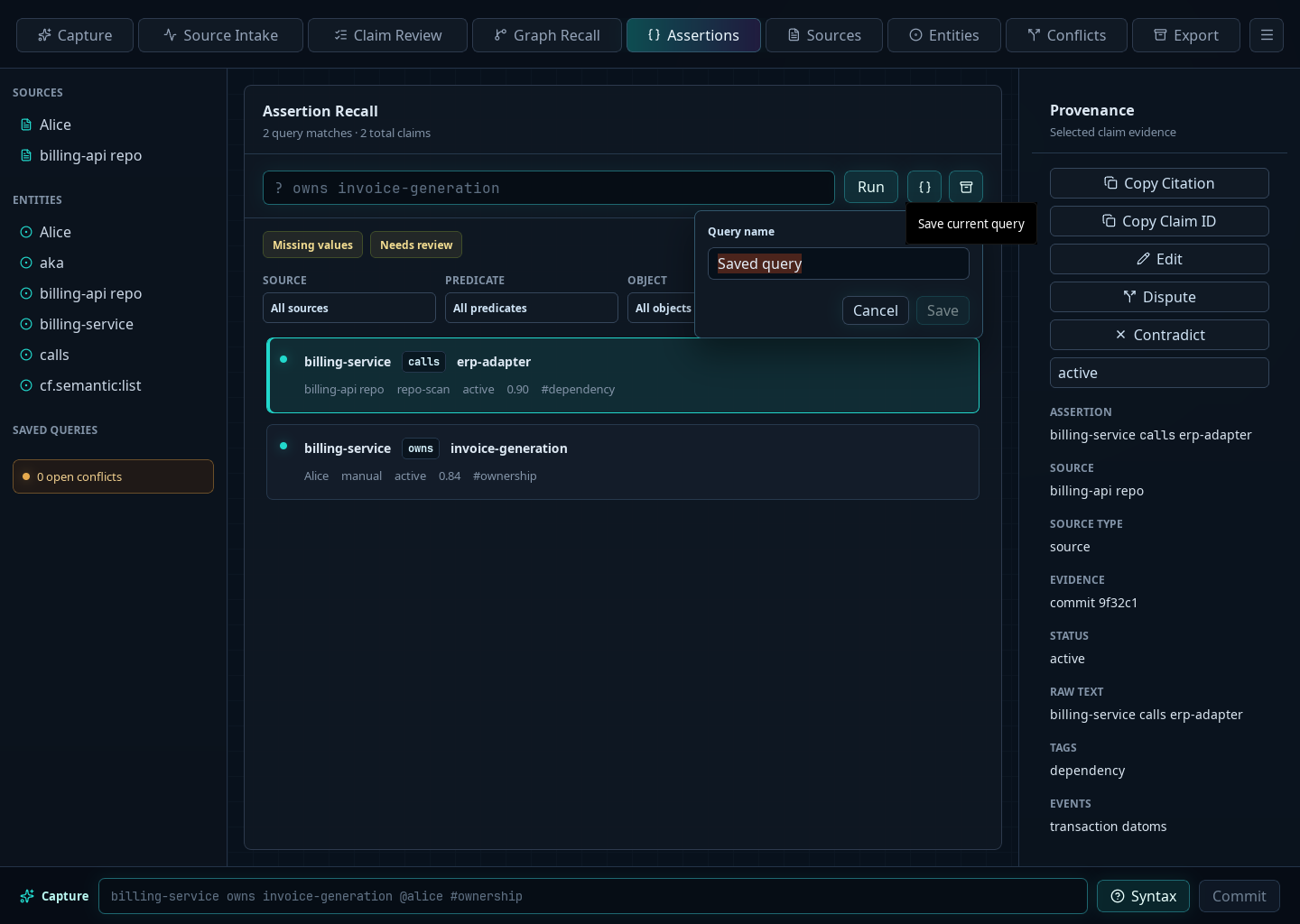
For example:
? owns invoice-generation
If a structured query returns nothing, remove one exact value or replace it with ?. If you remember wording but not its position, use a shorter text search.
Saving a query does not copy or freeze its current results. Running it later evaluates the saved pattern against the vault’s then-current facts.
Export vault content
Choose File → Export Vault to start a CFText export in Vaults. The exported file is a current-state copy of the vault for sharing or editing; it does not save only the current query results. Keep the original vault and its backups for provenance and full review history.